Concept Creating

Design Research

Prototyping

Video Editing

Wireframing

Figma

Adobe Dimension

Adobe Photoshop

Adobe Illustrator

Premiere Pro

MusicNet

MusicNet

MusicNet

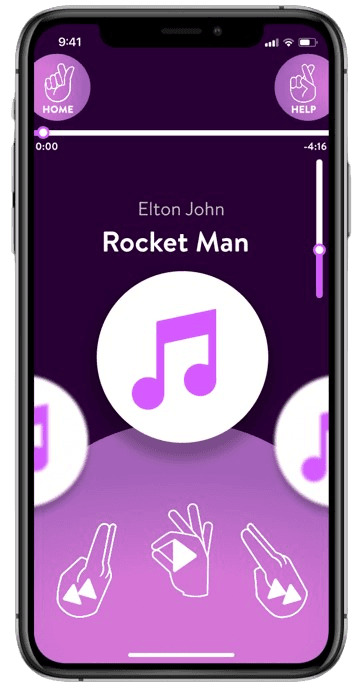
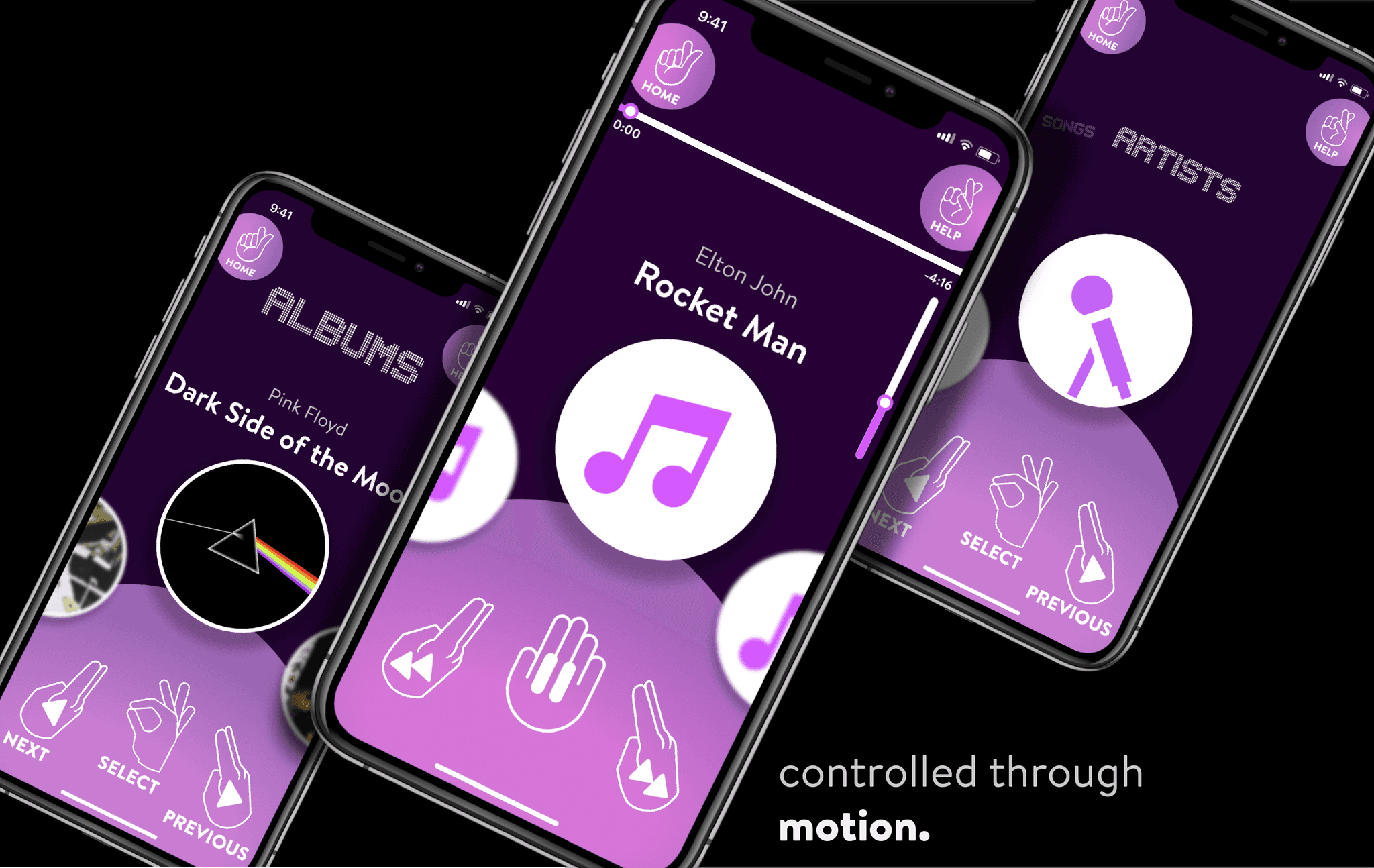
A music app controlled with hand gestures.

A music app controlled with hand gestures.

A music app controlled with hand gestures.
Timeline

Sep - Nov 2021

Course

Natural User Interfaces & Objects

Professor

Graham Plumb

Timeline

Sep - Nov 2021

Course

Natural User Interfaces & Objects

Professor

Graham Plumb

Timeline

Sep - Nov 2021

Course

Natural User Interfaces & Objects

Professor

Graham Plumb

Project Brief

Today almost everything is being done through a smartphone, like ordering food at a restaurant or checking into a flight.

​With our current smartphone technology, we realize that our visionary senses are limited to a couple of tools: our fingers, and our phone. We take for granted what we can feel and manipulate with our hands every day, a human experience that a glass screen cannot live up to.

Today almost everything is being done through a smartphone, like ordering food at a restaurant or checking into a flight.

​With our current smartphone technology, we realize that our visionary senses are limited to a couple of tools: our fingers, and our phone. We take for granted what we can feel and manipulate with our hands every day, a human experience that a glass screen cannot live up to.

How might we help music lovers play their music through a natural user interface in diverse environments?

How might we help music lovers play their music through a natural user interface in diverse environments?

Solution

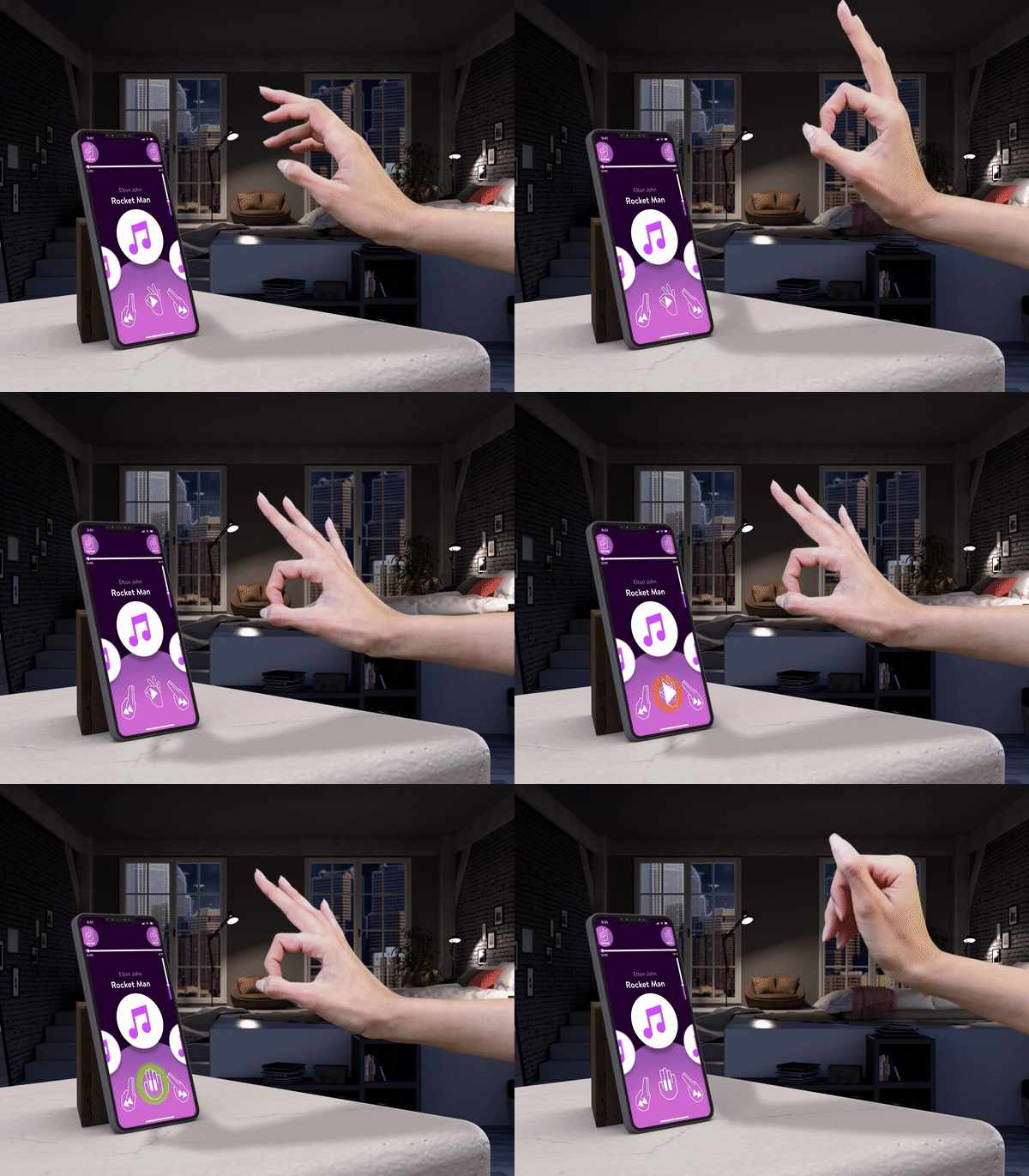
​A music app that expands your tactical abilities, expanding your intuition outside of a small screen.

With MusicNet, one can play music "on-air", without any contact, without ignoring surroundings, and without limiting one's senses to just a couple of fingers.

Play, pause, skip, shuffle, and browse your music effortlessly with a few hand gestures.

Since Natural User Interfaces (NUIs) are becoming more apparent in our society, this human experience can help us be more aware of our surroundings.
​A music app that expands your tactical abilities, expanding your intuition outside of a small screen.

With MusicNet, one can play music "on-air", without any contact, without ignoring surroundings, and without limiting one's senses to just a couple of fingers.

Play, pause, skip, shuffle, and browse your music effortlessly with a few hand gestures.

Since Natural User Interfaces (NUIs) are becoming more apparent in our society, this human experience can help us be more aware of our surroundings.
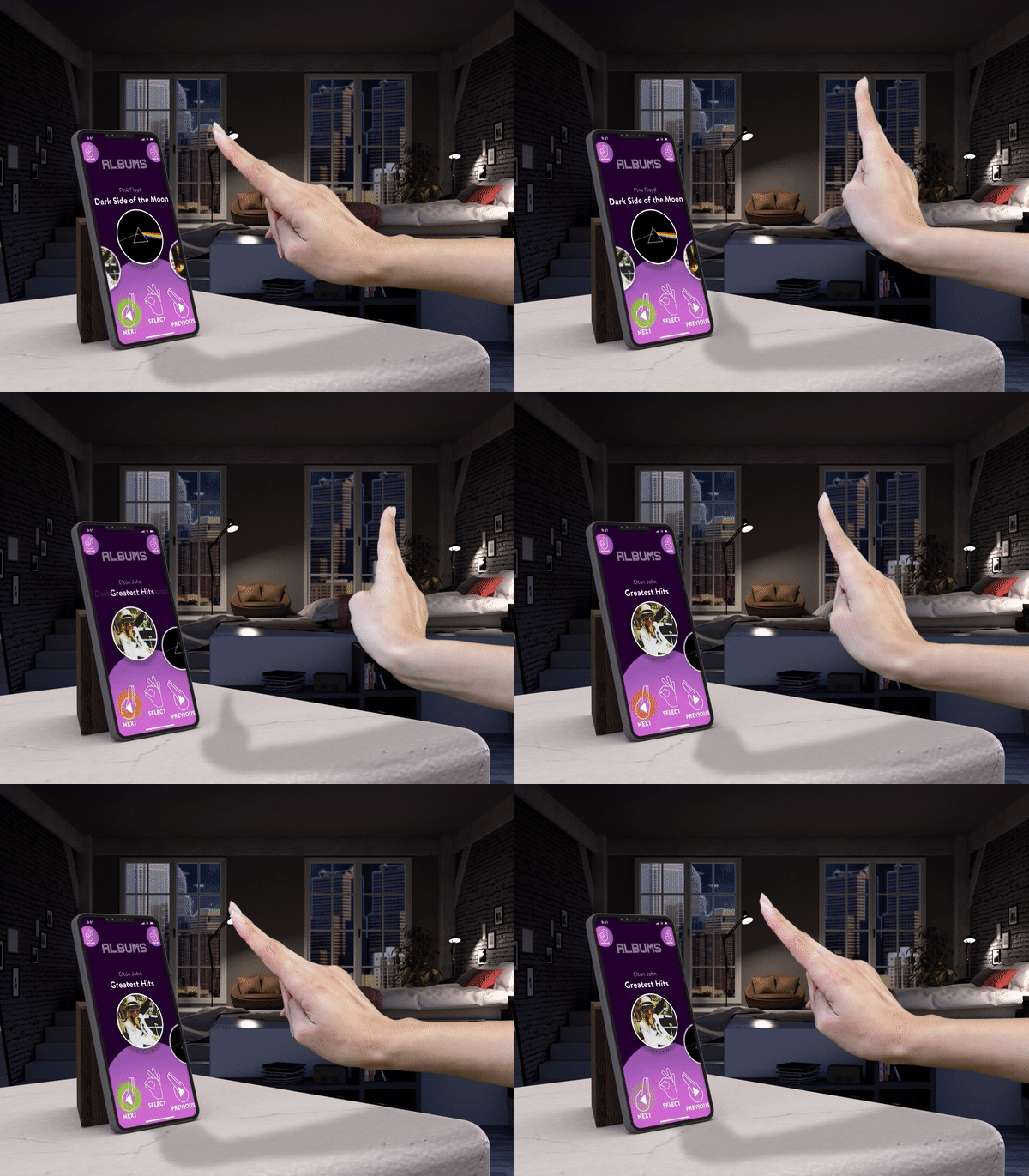
Play

Pause

Next/ Previous

Volume Up/ Down

Shuffle

Design Process

1

Exploring Gestures

1

Exploring Gestures

6

Wireframing

6

Wireframing

2

Designing Gestures

2

Designing Gestures

7

User Testing

7

User Testing

3

Echo + Semantic Feedback

3

Echo + Semantic Feedback

8

Style Guide

8

Style Guide

4

Task Flow Diagrams

4

Task Flow Diagrams

9

Green Screen Filming

9

Green Screen Filming

5

Onboarding

5

Onboarding

1

Exploring Gestures

1

Exploring Gestures

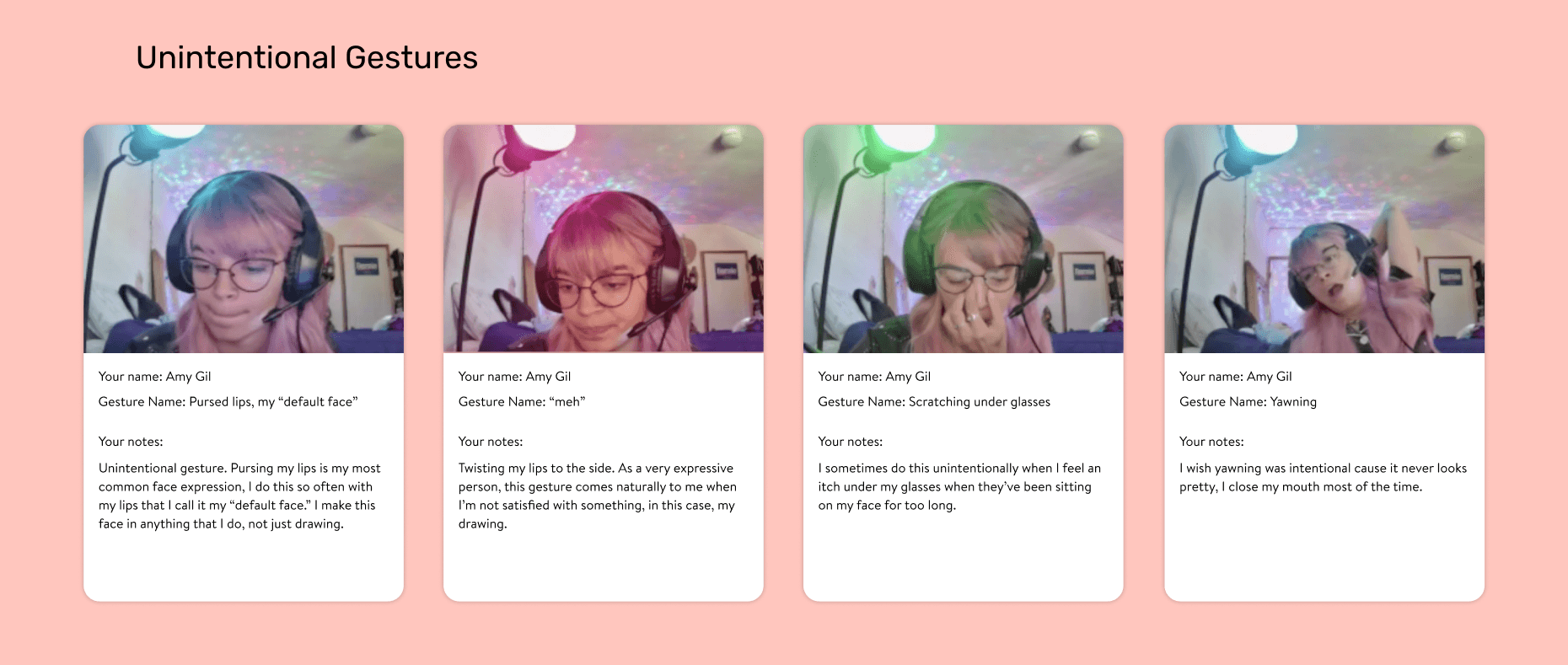
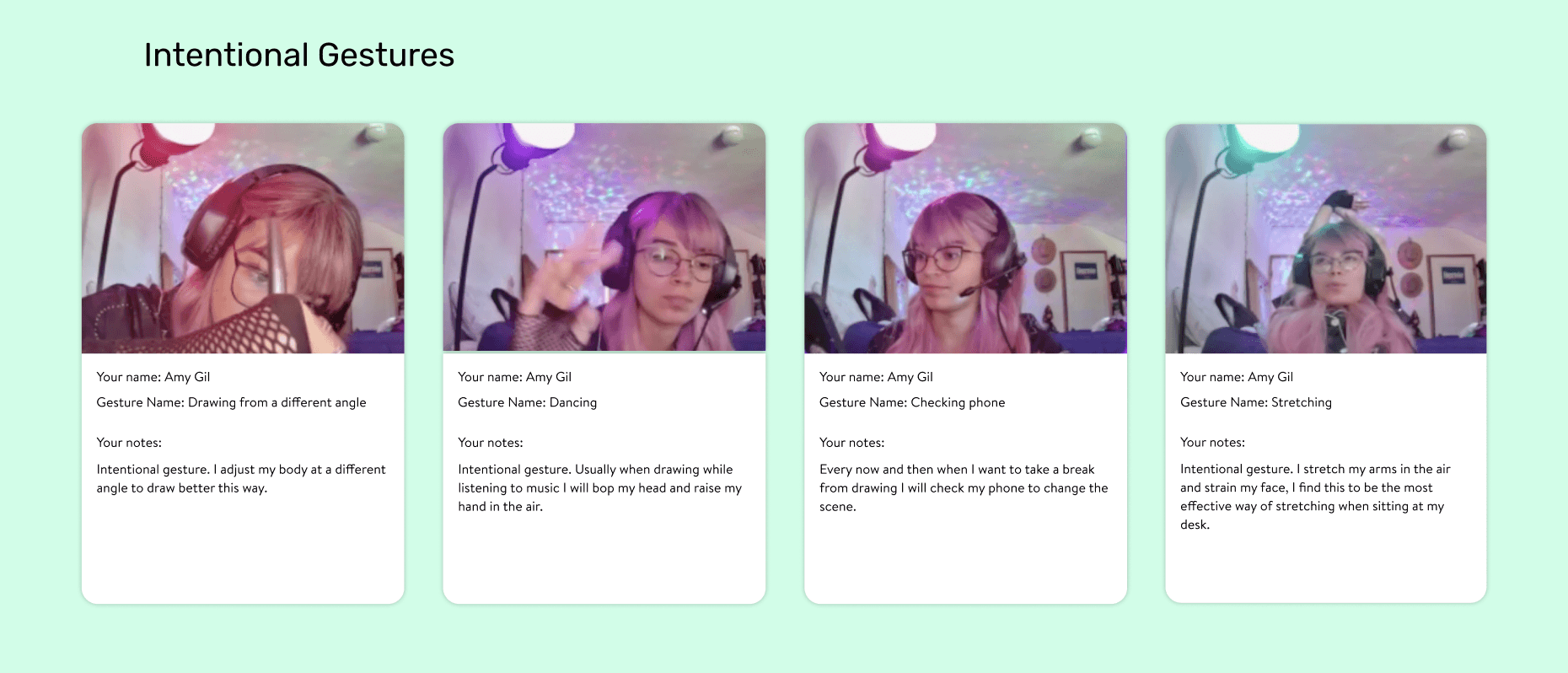
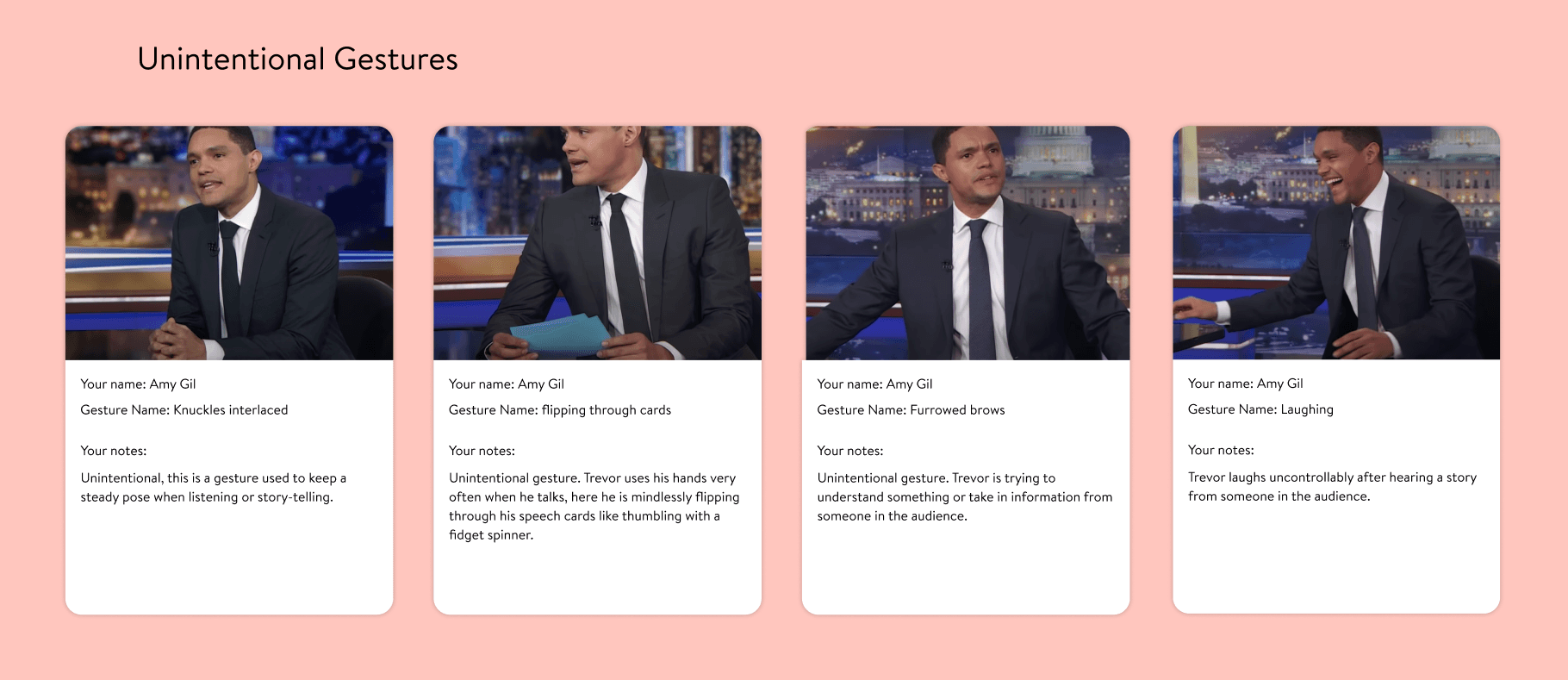
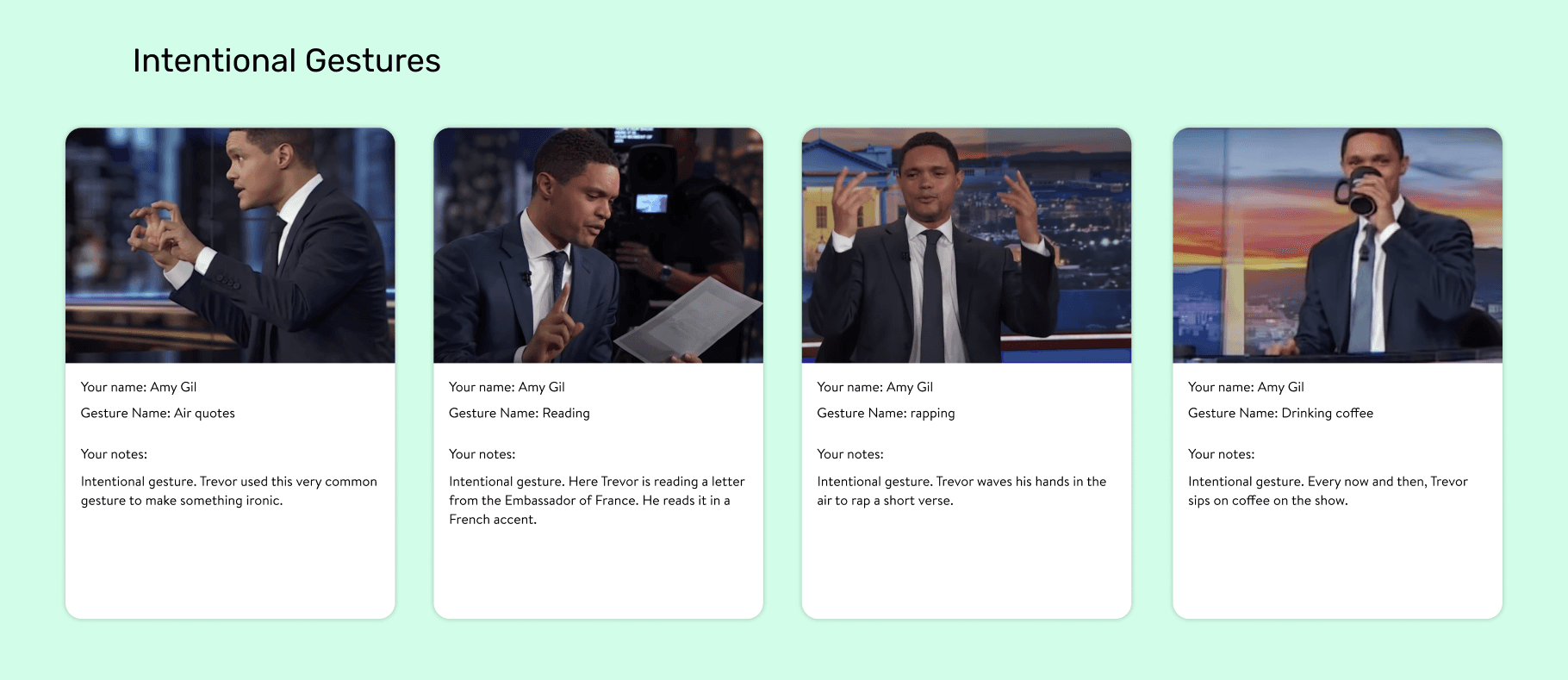
By exploring gestures that happen when doing daily activities, I can get a better understanding on what gestures come naturally and what gestures are intentional.

The goal of this exercise is to explore a gestural language that is learnable via the app that I am creating.

By exploring gestures that happen when doing daily activities, I can get a better understanding on what gestures come naturally and what gestures are intentional.

The goal of this exercise is to produce a gestural language that is learnable via the music app that I am creating.

A documentation of personal gestures during a live drawing session on Twitch.

A documentation of personal gestures during a live drawing session on Twitch.

A documentation of Trevor Noah's gestures on The Daily Show.

A documentation of Trevor Noah's gestures on The Daily Show.

2

Designing Gestures

2

Designing Gestures

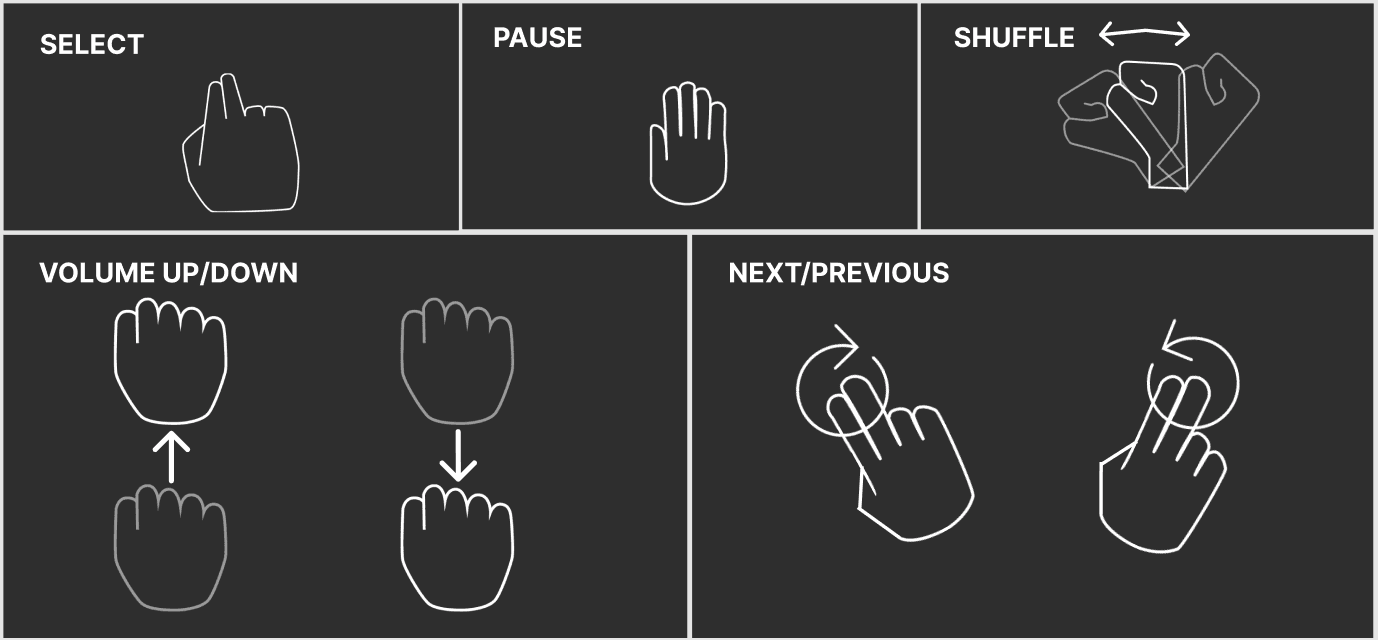
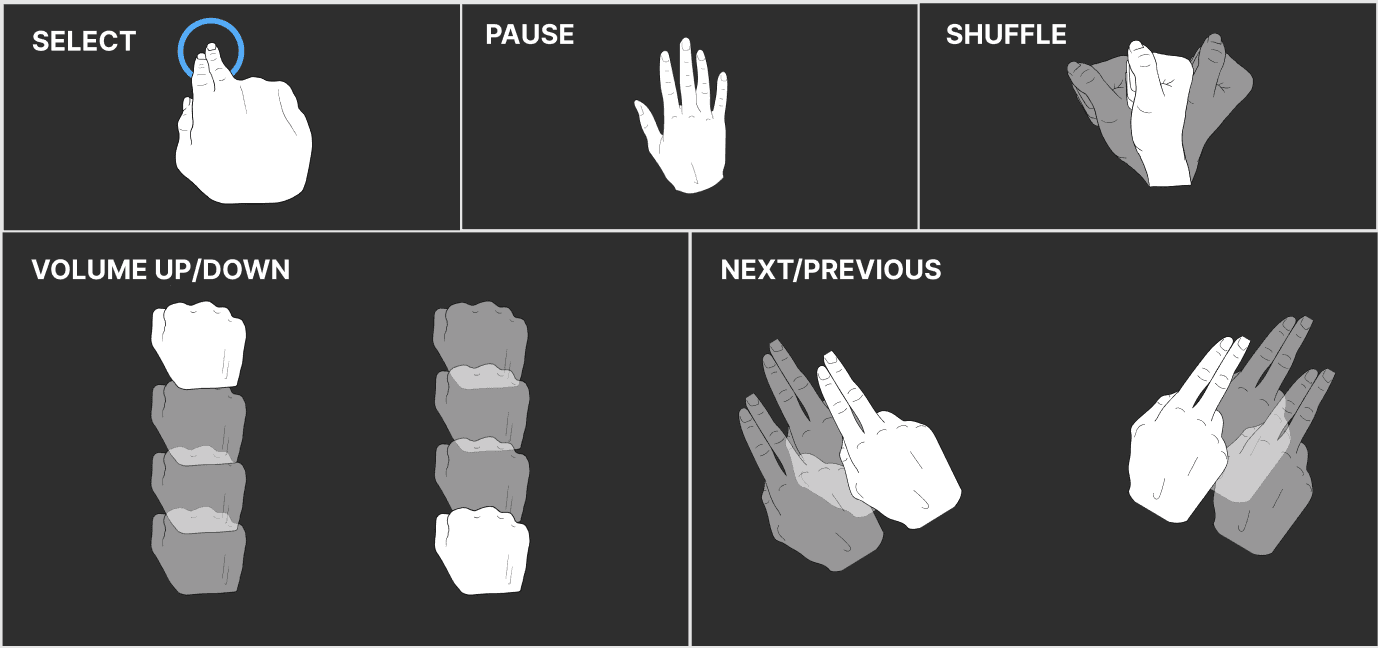
In this phase of the design process, I designed some basic gestures that made sense to me and presented them to some classmates to receive feedback:


• Which styles make more sense? Figurative gestures, stylized gestures, or a mixture of both?

• Were the gestures easy to replicate?

• Did the gesture relate to the intended action?

In this phase of the design process, I designed some basic gestures that made sense to me and presented them to some classmates to receive feedback:

• Which styles make more sense? Figurative gestures, stylized gestures, or a mixture of both?

• Were the gestures easy to replicate?

• Did the gesture relate to the intended action?

Stylized gestures

"Although the stylized representation has an arrow to hint the direction, the transparency on contour line is not as obvious as shape. If there is a specific direction [for the next/previous gesture], the stylized representation works better." -Emily Tseng

"I like the simplicity of the line art hands from option 1, especially with the gestures that are not too complicated" -Noah Ahrens

"Although the stylized representation has an arrow to hint the direction, the transparency on contour line is not as obvious as shape. If there is a specific direction [for the next/previous gesture], the stylized representation works better." -Emily Tseng

Figurative gestures

"I like the figurative one more because the blue circle hints the motion and the focus of the gesture, which is clearer than the stylized representation. Both representations for the next/previous gesture give me the interpretation of putting my two fingers together and waving my hands around." -Emily Tseng

"I like the second style illustrations they seemed easier to grasp, however you might consider also adding arrows to some of the directional ones." -Noah Ahrens

"I like the figurative one more because the blue circle hints the motion and the focus of the gesture, which is clearer than the stylized representation. Both representations for the next/previous gesture give me the interpretation of putting my two fingers together and waving my hands around." -Emily Tseng

Some constraints to consider:


  1. Field of view and orientation -> the phone and user should be in a vertical position for best results.

  2. Clear gestures -> the camera is always on and looking, meaning that design of the gestures should be very clear to avoid confusion between an explicit and implicit movement.

  3. Accidental triggers -> don't design gestures that are similar to each other or similar to gestures that happen outside of the app.

3

Echo + Semantic Feedback

3

Echo + Semantic Feedback

Echo and semantic feedback are essential to avoid leaving the user puzzled by their actions.


Echo feedback 'echoes' what the user is doing, such as moving the mouse cursor across the screen. Semantic feedback uses visual / auditory / tactile methods to let the user know they have completed a task successfully. A good example of semantic feedback is a button changing color after a user has clicked it.

Echo and Semantic Feedback are essential to avoid leaving the user puzzled by their actions.

Echo Feedback 'echoes' what the user is doing such as moving the mouse cursor across the screen. Semantic feedback uses visual / auditory / tactile methods to let the user know they have completed a task successfully. A good example of semantic feedback is a button changing color after a user has clicked it.

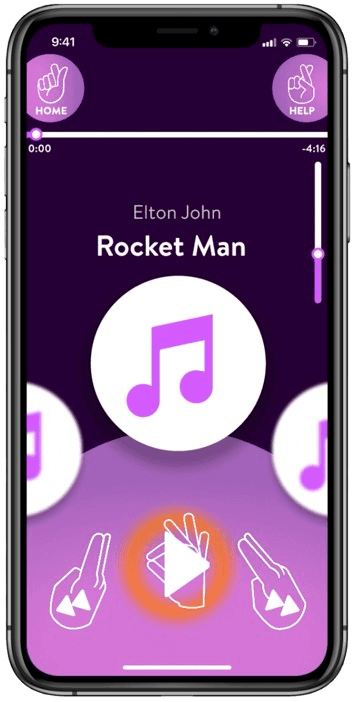
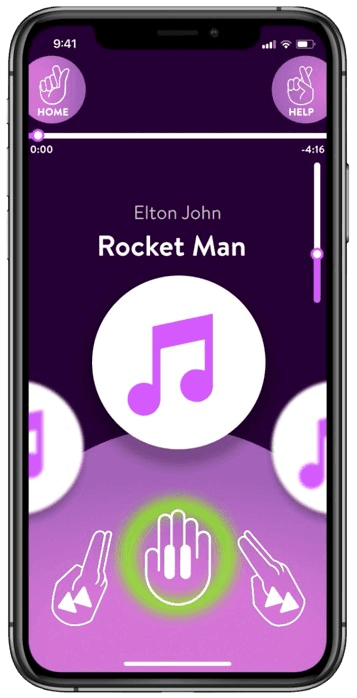
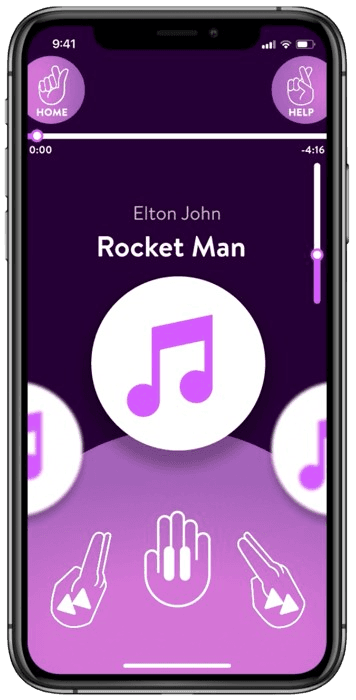
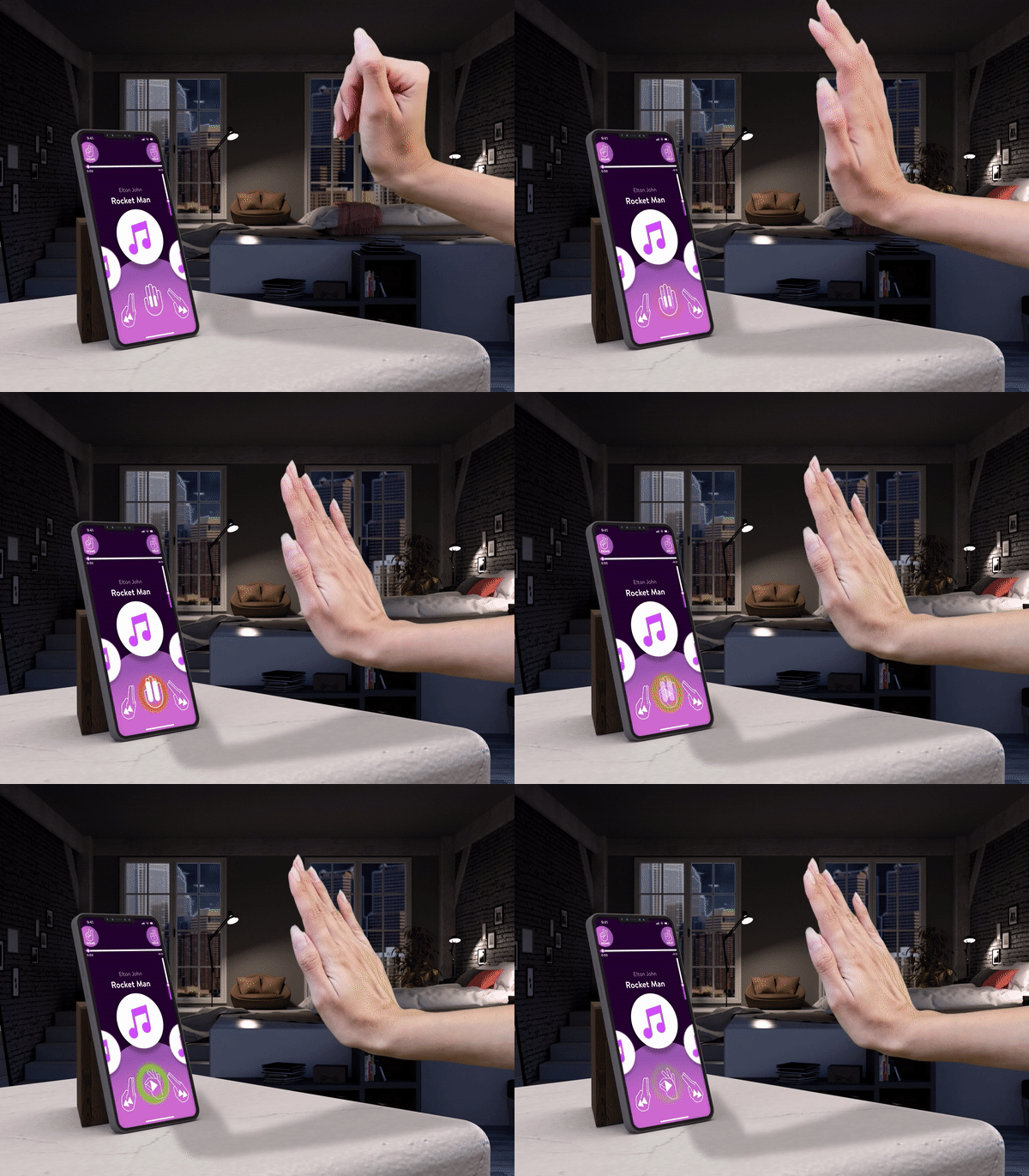
Example of "play" feedback in MusicNet. The red circle indicates that the action has been detected, while the enlarged play button indicates that the button has been 'selected'. The green circle means that the action has been completed successfully.

Example of "play" feedback in MusicNet. The red circle indicates that the action has been detected, while the enlarged play button indicates that the button has been 'selected'. The green circle means that the action has been completed successfully.

4

Task Flow Diagrams

4

Task Flow Diagrams

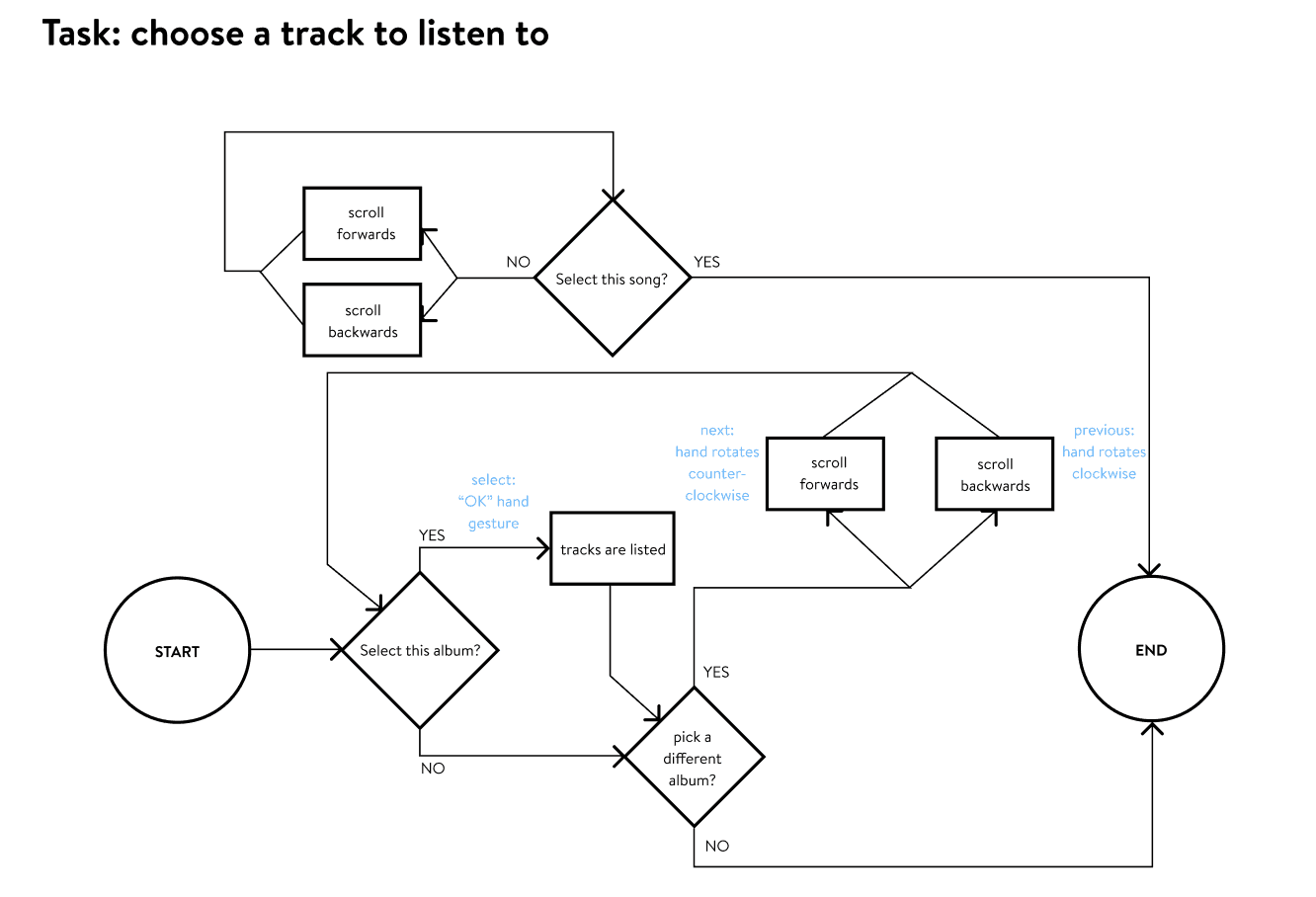
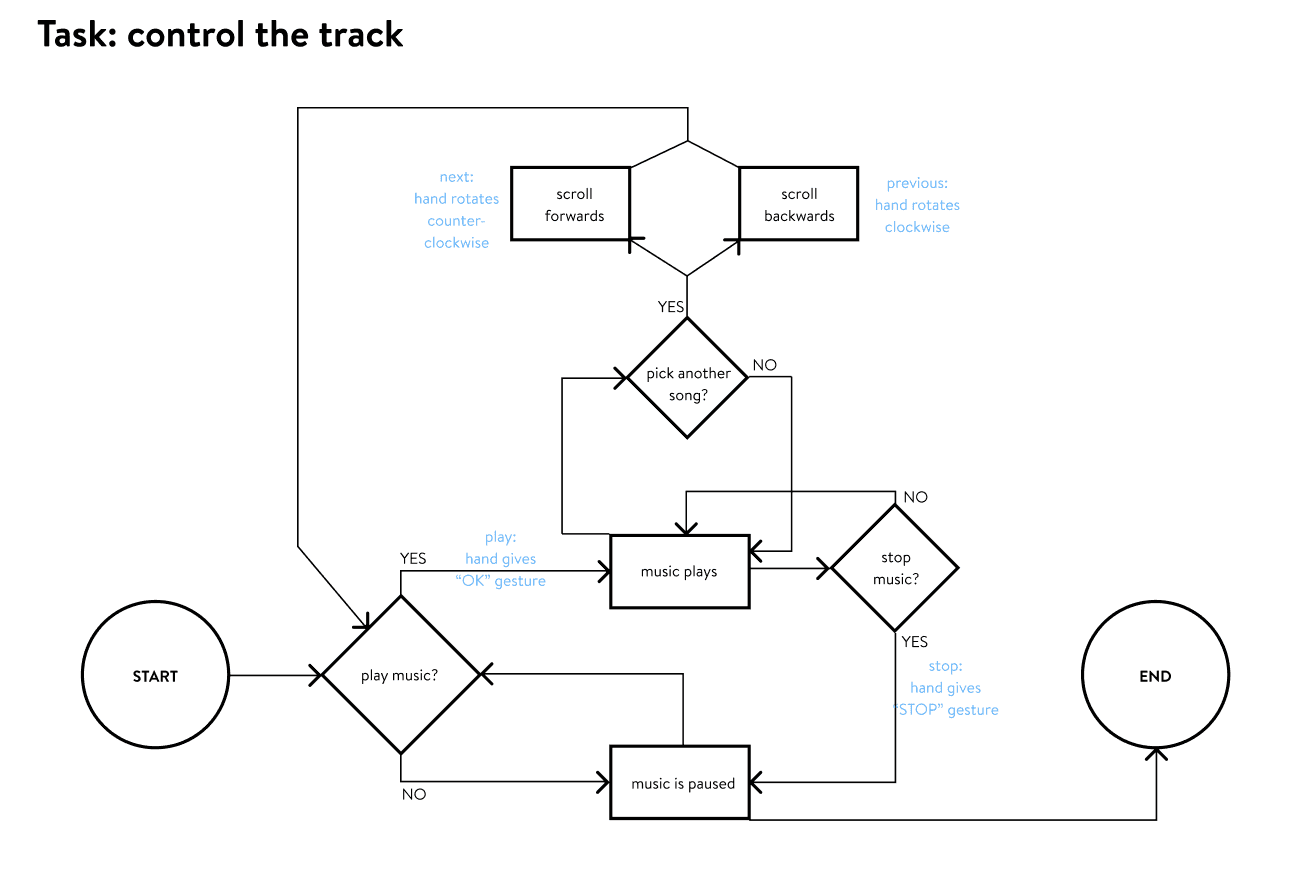
I made task flow diagram for two user journeys: choose a track to listen to, and control the track. The blue text indicates when the user is using hand gestures.

Making a task flow diagram was a useful tool for me to organize the journey for the user in the music app.

I made task flow diagram for two user journeys: choose a track to listen to, and control the track. The blue text indicates when the user is using hand gestures.

Making a task flow diagram was a useful tool for me to organize the journey for the user in the music app.

5

Onboarding Experience

5

Onboarding Experience

The onboarding experience is the first step a user usually takes when using a product / app for the first time. Examples of these are walkthroughs and tutorials. Providing an onboarding experience for my users will help them navigate through the app.

Echo and Semantic Feedback are essential to avoid leaving the user puzzled by their actions.

Echo Feedback 'echoes' what the user is doing such as moving the mouse cursor across the screen. Semantic feedback uses visual / auditory / tactile methods to let the user know they have completed a task successfully. A good example of semantic feedback is a button changing color after a user has clicked it.

A red circle means the gesture is noticed and being processed by the user.


A green circle means the gesture has been completed.


A red circle means the gesture is noticed and being processed by the user. A green circle means the gesture has been completed.

6

Wireframing

6

Wireframing

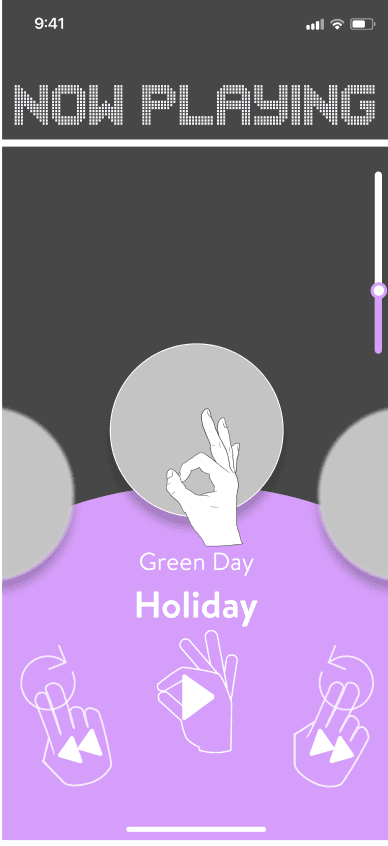
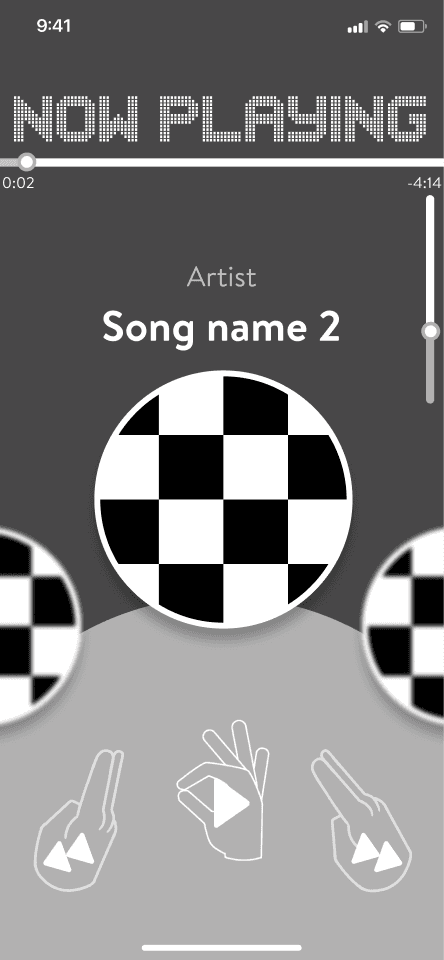
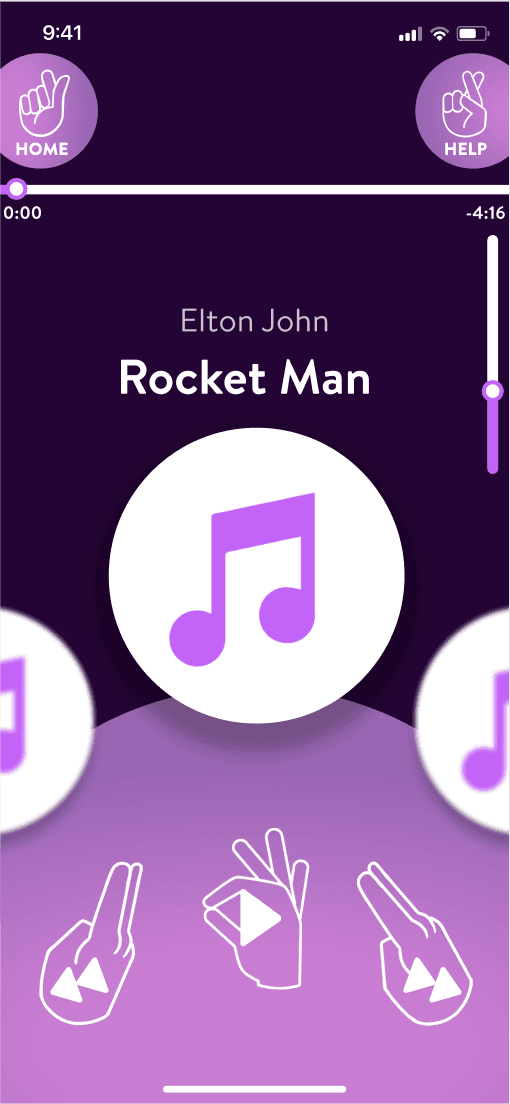
For the design of the music app, I took the idea of a spinning wheel, sort of like a wheel of fortune. Since I wanted to make this music app "feel" as real as possible, I wanted the user to "feel" like they were physically navigating with their hand.

For the design of the music app, I took the idea of a spinning wheel, sort of like a wheel of fortune. Since I wanted to make this music app "feel" as real as possible, I wanted the user to "feel" like they were physically navigating with their hand.

Wireframe iterations from left (lowest) to right (highest).

Wireframe iterations from top (lowest) to bottom (highest).

7

User Testing

7

User Testing

With "Wizard of Oz Testing", the designer pretends to be the computer — they provide the magic by controlling the user tester’s ability to ‘activate’ the UI.

Over Zoom, I had 1 classmate test my prototype. It was my first time testing this way.

With "Wizard of Oz Testing", the designer pretends to be the computer — they provide the magic by controlling the user tester’s ability to ‘activate’ the UI.

Over Zoom, I had a classmate test my prototype. It was my first time testing this way.

With "Wizard of Oz Testing", the designer pretends to be the computer — they provide the magic by controlling the user tester’s ability to ‘activate’ the UI.

Over Zoom, I had a classmate test my prototype. It was my first time testing this way.

Questions I asked:


  1. How long do you spend using a music application in a week?

  2. Was the onboarding process clear enough?

  3. Were there too many or too few gestures?

  4. Did you feel like you could remember the gestures that were explained in the onboarding?

  5. Did you feel like the gestures were a good fit for the function?

Questions I asked:


  1. How long do you spend using a music application in a week?

  2. Was the onboarding process clear enough?

  3. Were there too many or too few gestures?

  4. Did you feel like you could remember the gestures that were explained in the onboarding?

  5. Did you feel like the gestures were a good fit for the function?

Top 5 takeaways:


  1. Echo Feedback -> colored echo feedback should be in the application as well, not just onboarding.

  2. Prototyping -> make more wireframes, properly connect all wireframes.

  3. Grammatical error -> grammatical error for “lowering volume” in onboarding section.

  4. Task issue -> user selected a song straightaway instead of selecting a song from the albums.

  5. Volume confusion -> in onboarding, change hand signal of releasing, could be confused with “Pause” hand gesture.

Top 5 takeaways:


  1. Echo Feedback -> colored echo feedback should be in the application as well, not just onboarding.

  2. Prototyping -> make more wireframes, properly connect all wireframes.

  3. Grammatical error -> grammatical error for “lowering volume” in onboarding section.

  4. Task issue -> user selected a song straightaway instead of selecting a song from the albums.

  5. Volume confusion -> in onboarding, change hand signal of releasing, could be confused with “Pause” hand gesture.

8

Style Guide

8

Style Guide

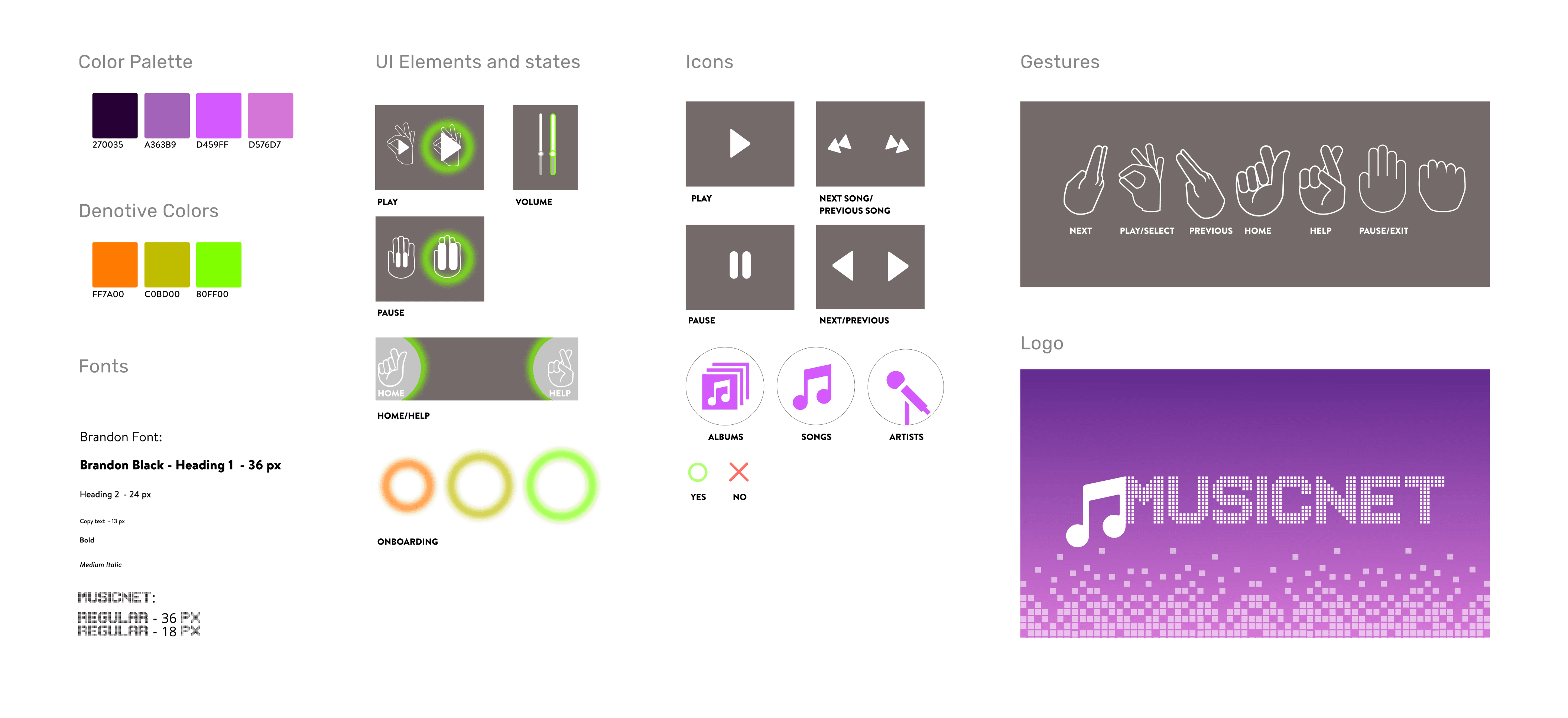
Color palette

Color palette

I chose neon-purple because it's a 'nighttime' color — when people come to party together and listen to music after a long day at work.

I chose neon-purple because it's a 'nighttime' color — when people come to party together and listen to music after a long day at work.

Gesture design

Gesture design

Gestures are stylized in the app so that the interface doesn't look busy. Gestures in onboarding are realistic-like to resonate with the user more.

Gestures are stylized in the app so that the interface doesn't look busy. Gestures in onboarding are realistic-like to resonate with the user more.

Denotive colors

Denotive colors

The orange is to indicate that the app can read the user's hand, in anticipation for action. The green is to indicate a successful hand gesture.

The orange is to indicate that the app can read the user's hand, in anticipation for action. The green is to indicate a successful hand gesture.

9

Green Screen Filming

9

Green Screen Filming

Green Screen filming is a method used by the film industry to ‘cut out’ actors from their background, so they can be artificially composited in a fabricated scene.

With "Wizard of Oz Testing", the designer pretends to be the computer — they provide the magic by controlling the user tester’s ability to ‘activate’ the UI.

Over Zoom, I had a classmate test my prototype. It was my first time testing this way.

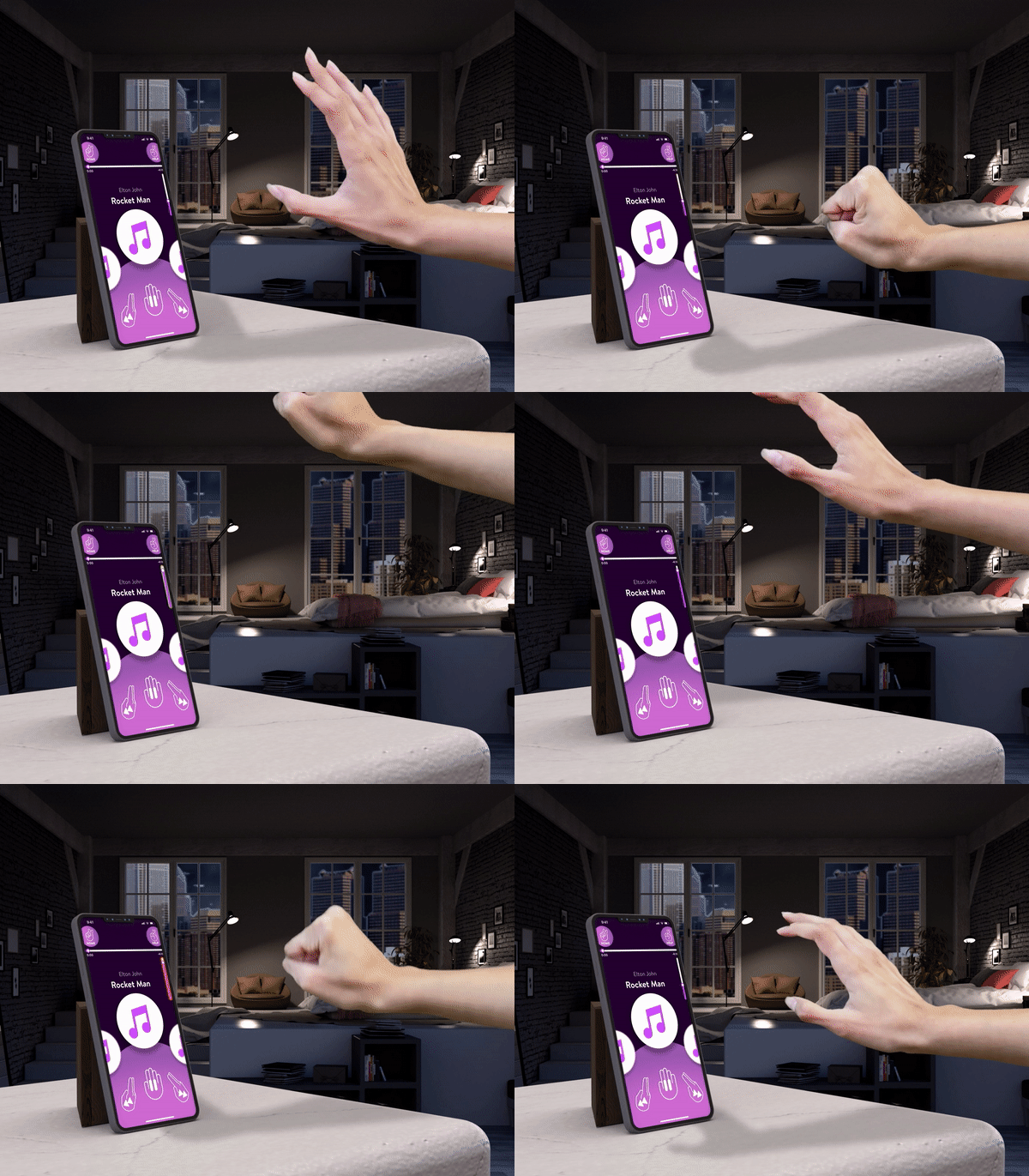
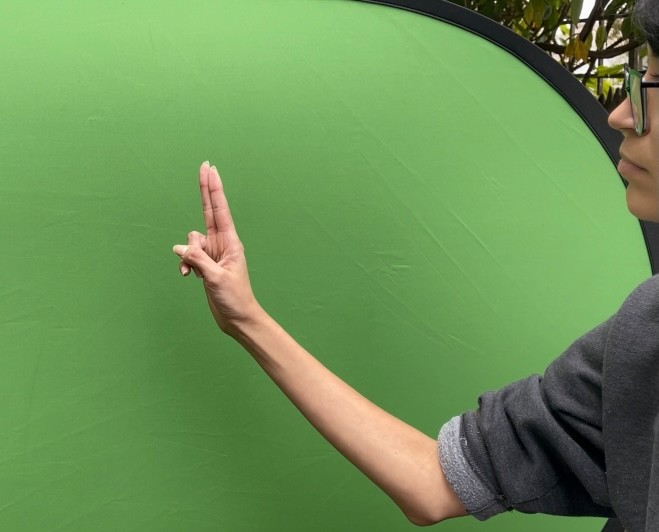
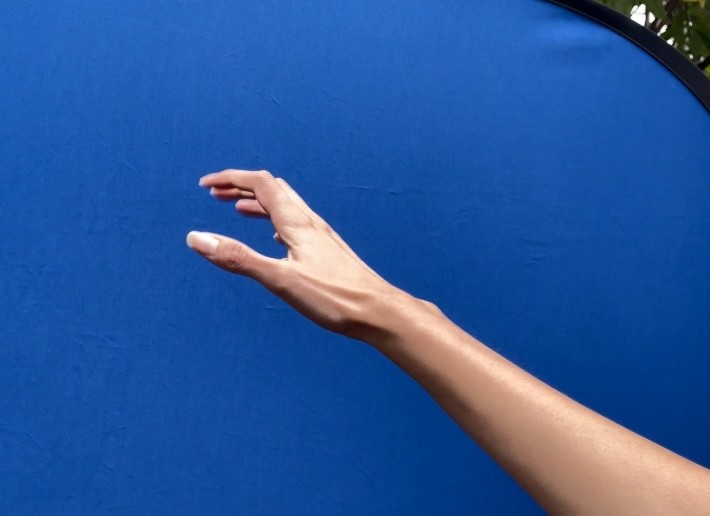
At first, I tested different angles to see what was the best point of view. I tested with the blue screen as well. The equipment that I used was a tripod to hold the green screen, a phone holder to record myself, and a clicker to start/stop recording.

At first, I tested different angles to see what was the best point of view. I tested with the blue screen as well. The equipment that I used was a tripod to hold the green screen, a phone holder to record myself, and a clicker to start/stop recording.

Next, I created a 3D scene in Adobe Dimension and rendered the image.

Next, I created a 3D scene in Adobe Dimension and rendered the image.

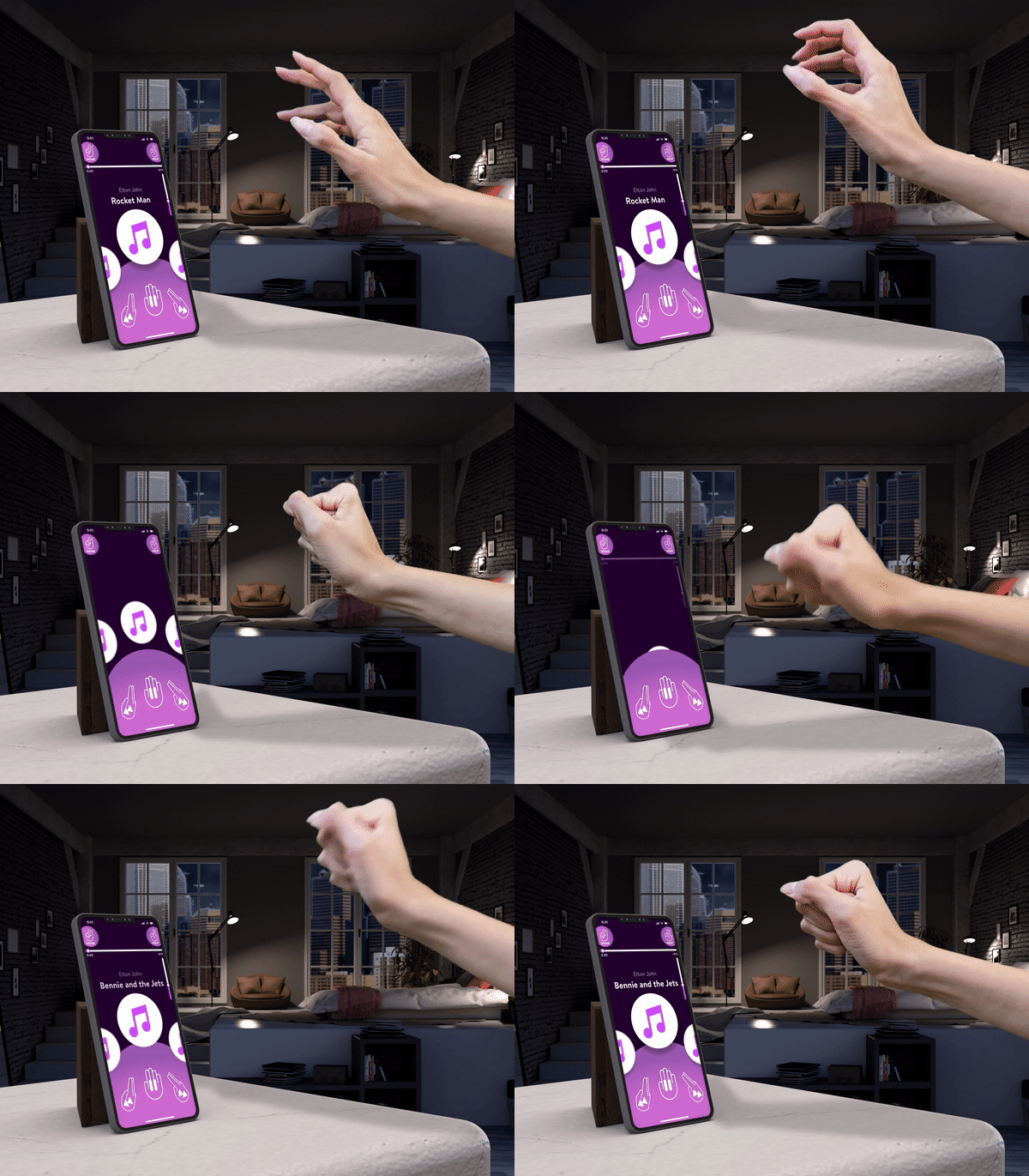
Lastly, I added everything to Premiere Pro to make it look like this!

Lastly, I added everything to Premiere Pro to make it look like this!

Reflections

What's exciting about Natural User Interfaces is our ability to expand our intuitive senses by not limiting our tactile abilities to only swiping, pinching, and tapping. 

Playing on my phone for hours makes me tired, inattentive, and also a bit frustrated. Having an
object close to my face for so long can feel a bit invasive and sometimes I have to look up for a
brief moment to take a break. Because the phone in my hands is so small I give it all of my
attention, ignoring my surroundings. There are times when I would much rather talk to a person. I would like to take over the role of making more enjoyable interactive experiences through Natural User Interfaces as much as possible. There is no doubt in mind that our tactile abilities will be used more above all else, we experience this already with Virtual Reality tools and immersive museums. I believe that a dynamic medium that we can see, feel, and manipulate is what humans prefer because this kind of technology feels more natural.
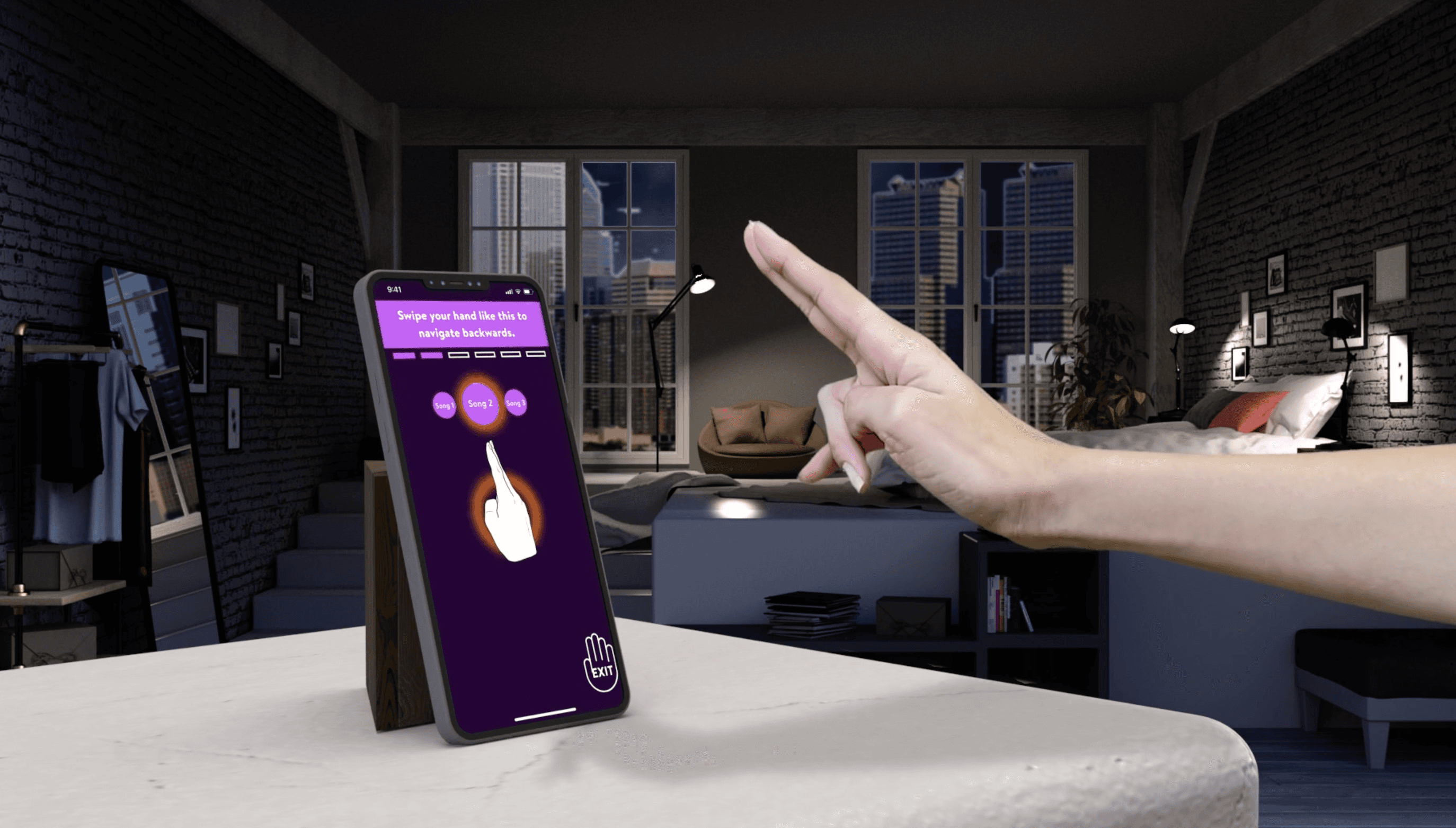
What I enjoyed most about this project was creating the wireframes and green screen filming. I was surprised as to how easy the green screening process was, and with enough good lighting, the effect can actually turn out pretty good! I enjoyed wireframing because I had the freedom to design what the music app would look like.

My next steps are: 1. Make a video to showcase the app, not just the onboarding process. 2. Design an interface for left-handed people.

What's exciting about Natural User Interfaces is our ability to expand our intuitive senses by not limiting our tactile abilities to only swiping, pinching, and tapping. 

Playing on my phone for hours makes me tired, inattentive, and also a bit frustrated. Having an
object close to my face for so long can feel a bit invasive and sometimes I have to look up for a
brief moment to take a break. Because the phone in my hands is so small I give it all of my
attention, ignoring my surroundings. There are times when I would much rather talk to a person. I would like to take over the role of making more enjoyable interactive experiences through Natural User Interfaces as much as possible. There is no doubt in mind that our tactile abilities will be used more above all else, we experience this already with Virtual Reality tools and immersive museums. I believe that a dynamic medium that we can see, feel, and manipulate is what humans prefer because this kind of technology feels more natural.

What I enjoyed most about this project was creating the wireframes and green screen filming. I was surprised as to how easy the green screening process was, and with enough good lighting, the effect can actually turn out pretty good! I enjoyed wireframing because I had the freedom to design what the music app would look like.

My next steps are: 1. Make a video to showcase the app, not just the onboarding process. 2. Design an interface for left-handed people.

©2025 Amaris Gil

©2025 Amaris Gil

Create a free website with Framer, the website builder loved by startups, designers and agencies.